EVFU-Screenshot.png
Image
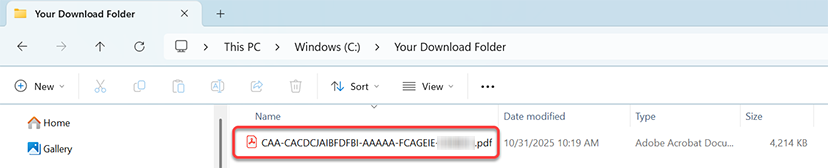

Electronic certified documents can be purchased online anytime, anywhere, 24-hours a day. It is fast, easy and convenient. Electronic certified documents are more secure and environmentally friendly in comparison to paper certified documents.
The signing authority is the District Clerk. The digital signature bearing the identity and authority of the Clerk is used to sign the document electronically.
Yes. Unsealed, non-confidential, and redacted documents are available for online viewing and purchase. Documents containing sensitive or protected information are generally not available to the public online. However, parties and attorneys of record may view and order eligible unredacted and confidential documents that are not sealed, subject to applicable access permissions.
Once your purchase is complete, you will receive an email containing links to your certified documents. The email is typically sent within minutes of purchase.
The cost of an electronic certified copy is $5.00 for certification, plus a copy fee of $1.00 for the first 10 pages and $0.10 for each additional page thereafter, in accordance with Texas Government Code §51.318(b)(7)(A)(iii)(a)(b). An additional $6.00 e-Certify service fee applies for electronic copies obtained through e-Certify.
Document contains 20 pages:
Total: $13.00
No, electronic certified documents do not have a wet seal. Instead, a digitally-signed certificate from the District Clerk is used on each electronic certified document.
Yes, however you should check with the agency to confirm whether they will accept an electronic version of the document or if a paper copy is required. If so, you can print a paper copy of the electronic certified document.
Yes, one of the benefits of using electronically certified documents is you can re-print and re-use them as many times as you would like.
It is recommended you download and save the electronic certified documents as soon as possible after purchasing. However, the document will be available to download for 30 days after the purchase date.
No. Electronic certified documents are valid from the time they are created and do not expire. Each electronic certified document has a unique tracking number and is digitally signed by the District Clerk. Electronic certified documents can be verified at any time.
If you are not a party to the case, the document will not be available electronically. You may submit a [PDF] and pay for the copies using the payment methods listed on the form.
If you are a Party to the Case or Attorney of Record and the document is not available online, please contact the Customer Service Division at 281-341-4515 or email at distclerk@fbctx.gov.
If you do not receive an email, check your spam/junk folder. If you are still unable to locate the email, you may view the documents by using the order number you received upon purchase. To do this, enter the receipt number and e-mail address on the Receipt Lookup page and click "Submit".
If you are a walk-in customer at the Clerk's Office, you can ask for a hard copy in addition to receiving the email. A fee will be applied for the additional copy.
There are several ways to verify a certified document is authentic.
Yes. You can open an electronic certified PDF document in any other compatible software. However, the availability and confirmation of the authenticity and authorship of the document will be subject to the capabilities of the reader software.
Triedata’s Clerk E-Certify is the product of thorough and rigorous engineering processes. Triedata’s Clerk E-Certify uses advanced cryptographic techniques to protect the documents. Its base standard uses the 2048-bit RSA key (a.k.a. asymmetric cryptography) for validating identity (signing) and ensuring that the document content is protected against any tampering. Just how hard is to “break” an 2048-bit RSA key based certificate like those provided by Triedata’s Clerk E-Certify? It is estimated that standard desktop computing power would take 4,294,967,296 x 1.5 million years to break a Triedata’s Clerk E-Certify 2048-bit SSL certificate. The digital signature hardware is an FIPS 140-2 level 2 cryptographic hardware that is in compliance with U.S. government computer security standard used to approve cryptographic modules. When a document is digitally signed using Triedata’s Clerk E-Certify, the system embeds sufficient information within the document to indicate the long-term validity of the document for years to come.
Clerk E-Certify provides two fast and easy ways to verify and authenticate both your printed copies and your electronic certificates that have been issued by the District Clerk's Office.
Please watch this short video for more information on E-Certify document verification.
The District Clerk's Office provides two fast and easy ways to verify and authenticate printed copies and electronic certified copies.
Enter the Unique Reference Code from the original record and we will return you the authentication results.
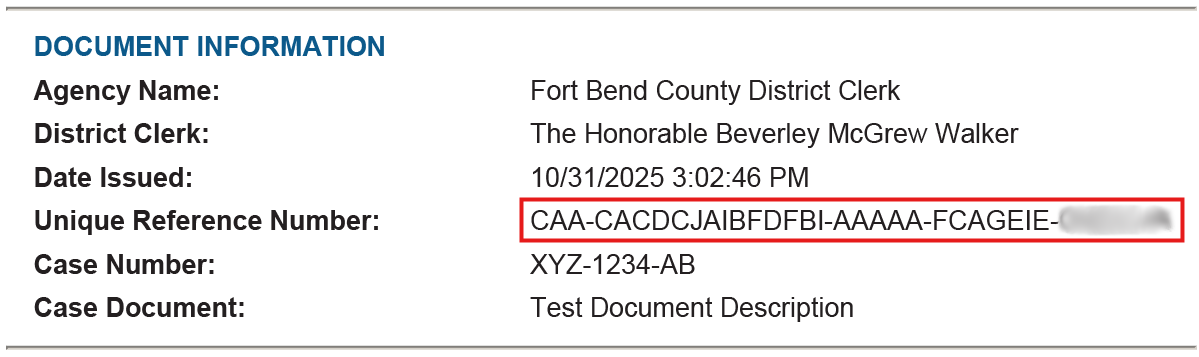
Users may upload an electronic certificate file and we will perform an automated authentication.
To purchase Electronically Certified Documents, select the “Online Document Search” link below. If the requested document(s) are not available online, you may submit a [PDF] or obtain copies in person at the District Clerk’s Office.
Due to statutory requirements, no fees will be charged for copies of documents in the following cases:
To obtain copies from these cases, a formal request must be submitted using the approved [PDF], or you may obtain copies in person at the District Clerk’s Office.
All requests must comply with applicable procedures for accessing sensitive or restricted documents.
The amount of time it will take to deliver the Electronic Certified Document(s) will depend on your email server. There may be a brief wait time before receiving an email to your inbox.
The Fort Bend County District Clerk is now offering Electronic Certified Court Documents for purchase on the Clerk's website. Each electronic certified document uses advanced encrypted features to produce a tamper proof electronic certified document that will include a unique District Clerk digital signature.
With Electronic Certified Documents, local governments are taking steps to serve a digital society and tackle document fraud while increasing efficiency.
Benefits of Electronic Certified Documents are:
Watch the newly elected and reelected officials of Fort Bend County take their oaths of office.
The Fort Bend County District Clerk’s Office is unable to provide legal advice or paperwork.
However, you can find valuable resources to assist you in filing a case by visiting the following link:
. Additionally, if you require further support and research assistance, you may wish to visit the Willie Milton Law Library at the Justice Center.
Willie Milton Law Library
Justice Center
1422 Eugene Heimann Circle, Suite 20714
Richmond, TX 77469
You can also reach the library directly at 281-341-3718.
In order to have a party served you will need to complete a Request for Process Form located at and submit it to the District Clerk’s Office. The cost to prepare service papers to a party is $8.00. If you are requesting to have it served via a Fort Bend Constable, the cost is $88.00.
(Please note that the Fort Bend County Constable’s Office is only authorized to serve a party within the Fort Bend County jurisdiction).
If this is your first missed jury date, please contact our office, and we will reschedule you over the phone. If this is your second missed jury date, rescheduling will require approval from the Judge. You will need to send an email or letter to the District Clerk’s Office at the following address:
District Clerk’s Office
ATTN: Jury Dept.
301 Jackson Street
Richmond, Texas 77469
If approved by the Judge, our office will reschedule you and contact you with a rescheduled date.
The Fort Bend County District Clerk’s Office is unable to provide legal advice or paperwork. You may visit the Willie Melton Law Library at the Justice Center located at:
Willie Milton Law Library
Justice Center
1422 Eugene Heimann Circle, Suite 20714
Richmond, TX 77469
to conduct research or can also reach the library at 281-341-3718. You may also reach out to a civil attorney or legal aid for further assistance.